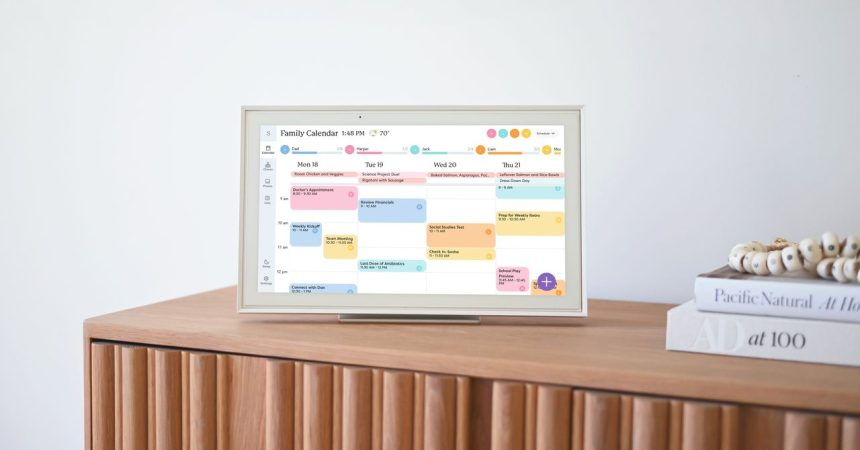
Managing schedules for a family of five is a special kind of chaos — three kids across three schools, extracurriculars, two shifting work calendars, plus the endless churn of meal planning and grocery runs. A shared Google Calendar helps, but it only goes so far. Enter the Skylight Calendar 2, a 15-inch Full HD touchscreen that has quietly become the informational nerve center of my kitchen.
Setup is refreshingly painless. The 15-inch model props up on a counter with its 180° adjustable stand, and Skylight also sells 10-inch and 27-inch versions (the two largest can be wall-mounted). The device pulls from existing calendars — Google, Apple, Microsoft, Cozi, and Yahoo — so your scheduling base populates instantly. From there, my 12-year-old, a true touchscreen native, took charge: color-coding a calendar for each kid, dragging activities into their lanes, and even carving out a category for household chores like garbage and recycling duty.
The real surprise was engagement. My teen and tween, now old enough to manage their own time, actually wanted to see everyone’s schedule. Instead of asking whether Thursday is free, they check the master calendar themselves. (Younger kids won’t get the same mileage — this device rewards households old enough to interact with it.) The trade-off: my personal Google Calendar notes are now visible to everyone, including the reminder to shop for a certain birthday gift. Privacy habits may need a rethink.
A shared grocery list — accessible from every phone via the Skylight app — has already killed our fridge-note system, which reliably produced forgotten bread and surplus bananas.
The premium tricks live behind Skylight Plus, which costs $79 per year (or $8 a month) and unlocks meal planning plus an AI assistant called Sidekick. Sidekick is the standout: it imports events from a photo of a paper schedule or a forwarded email. It isn’t flawless — scanned events need cleanup — but after 15 years of hand-entering dates, a rough starting point is a gift. It also scans printed recipes into a database, ready to assign to any day and view on the big screen. One quirk: adding a recipe’s ingredients to the grocery list is great for kale chips, less so for minestrone, which dutifully appends every dash of salt.
The biggest gripe is that I still make most edits on my phone. Physically, the Calendar 2 ships with a removable magnetic Snap Frame and wall mount, and comes in a Classic style at $299.99 and a Shadow Box style at $319.99. It went on sale on March 17, 2026.
I still open Google Calendar out of habit and mild paranoia. But as I keep tuning Skylight to fit our lives, I’m relying on it more each week. Now if only it could run a load of laundry.