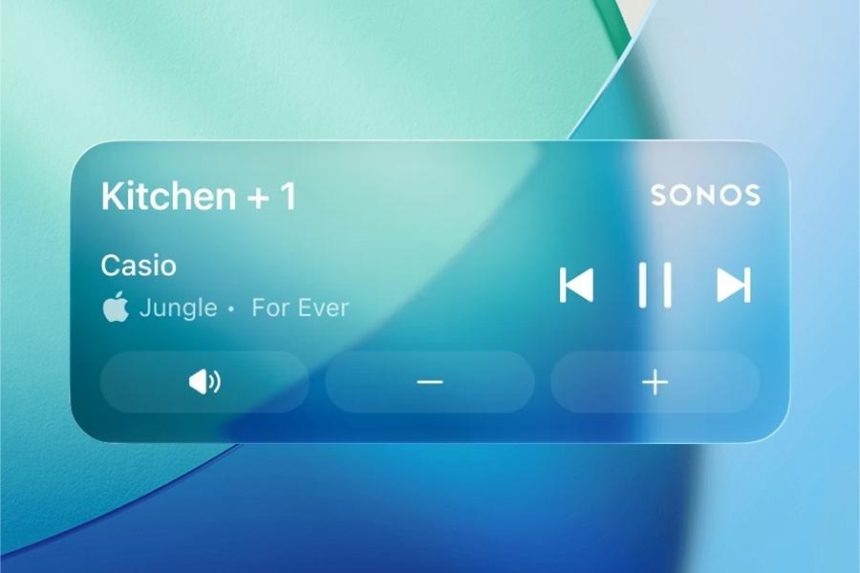
Sonos owners have been asking for this one for years, and it’s finally here. A recent update to the Sonos mobile app brings support for iOS Live Activities, meaning you can now pause, skip and control playback straight from your iPhone’s Lock Screen — no full unlock, no digging through the app required.
The feature rolled out on August 11, 2026, and Sonos itself described it as a “much requested, anticipated, and needed feature” in a post shared to Reddit. Given how much grief the company took over its app overhaul, delivering something users actually clamored for feels like a small but meaningful peace offering.
Here’s what the Sonos Live Activity gives you:
- Lock Screen controls for music and podcasts playing through your Sonos system
- Dynamic Island integration, so playback info tucks neatly into the top of newer iPhones
- Basic track and playback details at a glance
It’s not a full-blown replacement for the app, and there are a few notable omissions. Album art, for instance, doesn’t appear in the Live Activity — so you’ll get the essentials without the visual flair. Still, for the everyday act of hitting pause when someone walks in the room, that’s exactly the kind of friction this feature is meant to remove.
Getting it running is straightforward. iOS users just need to head into App Preferences and enable the Live Activity. Once switched on, controls surface automatically whenever audio is flowing through your speakers, whether that’s a single Sonos One in the kitchen or a whole-home setup humming along in every room.
What makes this addition so satisfying is how obvious it always was. Lock Screen media controls are table stakes for most streaming apps, and Sonos users have long grumbled about having to fully open the app just to nudge the volume or skip a track. Apple’s Live Activities framework — the same system that powers sports scores and delivery timers on the Lock Screen and in the Dynamic Island — is a natural fit for this kind of persistent, glanceable control.
The move also signals that Sonos is steadily patching up the rough edges of its software after a bumpy stretch. Restoring quick controls where people expect them is precisely the sort of quality-of-life fix that rebuilds trust, even if it doesn’t grab headlines the way a new speaker would.
If you own a Sonos system and an iPhone, it’s worth taking thirty seconds to enable the toggle. It won’t change how your speakers sound, but it will change how often you reach for the app at all — which, for a feature this overdue, is the whole point.