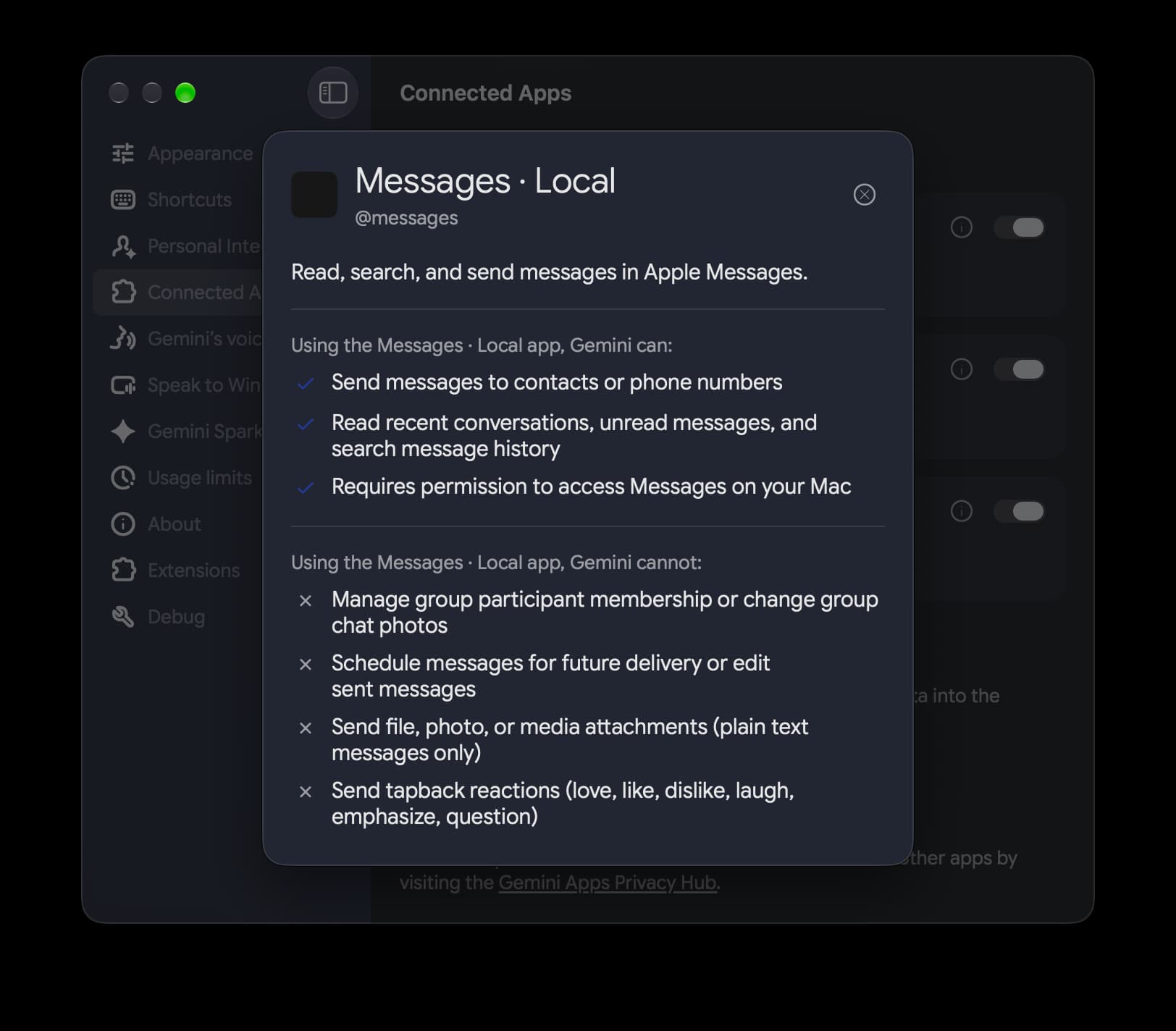
Google’s Gemini app for the Mac is getting ready to reach into one of the most personal corners of macOS: Apple Messages. Version 1.116.5.889 of Gemini for macOS adds a new Connected App called @messages, described as a way to “Read, search, and send messages in Apple Messages.” The integration works locally on the Mac, so Gemini can dig into conversations stored there and pull out context without the user copying and pasting chat snippets into the prompt box.
According to 9to5Google, which spotted the feature in an update on September 18, 2026, the integration can:
- Send messages to contacts or phone numbers
- Read recent conversations and unread messages
- Search the message history
Google’s own example prompts show the intended use: Send a message to John: “Running 5 minutes late!”, Show my recent messages from Sarah and Search Messages for dinner reservations. In other words, Gemini becomes a text-only front end for iMessage that can also act as a search engine over your chats.
What it will not do
The list of limitations is almost as long as the feature list. Gemini cannot:
- Manage group participant membership or change group chat photos
- Schedule messages for future delivery or edit sent messages
- Send file, photo or media attachments, as only plain text messages are supported
- Send tapback reactions (love, like, dislike, laugh, emphasize, question)
- Generate photos or images within automated task workflows
After the update, the Messages entry shows up at the very bottom of Settings > Connected Apps. The switch is there, but the plumbing is not finished: as of the afternoon of September 18, 2026, a server-side component appeared to be missing, and @messages was not yet recognized in the prompt box. Users who install the new build can see the option, but actual message handling depends on Google flipping the switch on its end.
A busy few months for Gemini on the desktop
The Messages hook is the latest in a string of Mac-specific additions. Recent updates brought a File Providers extension that adds an “Add to Gemini” item to the right-click menu in Finder, dropping a photo or document straight into the prompt box. It is enabled in Settings > Extensions. Google has also added Images, Videos and Daily Brief to the app’s side panel.
Gemini for desktop arrived on macOS in April 2026, and Google’s product page lists Apple Silicon Macs running macOS Sequoia (15.0) or newer as the requirement. The app is summoned with Option + Space. On September 10, 2026, Google brought the same desktop app to Windows 10 and 11, where it opens with Alt + Space.
The iMessage integration is a notable move for Google: it gives Gemini access to a messaging service that Apple keeps tightly to its own devices, and it positions Gemini as an assistant that can act inside macOS rather than just sit in a browser tab. Whether users are comfortable letting a Google AI read their private chats is another question, one the finished feature will have to answer once the server side goes live.