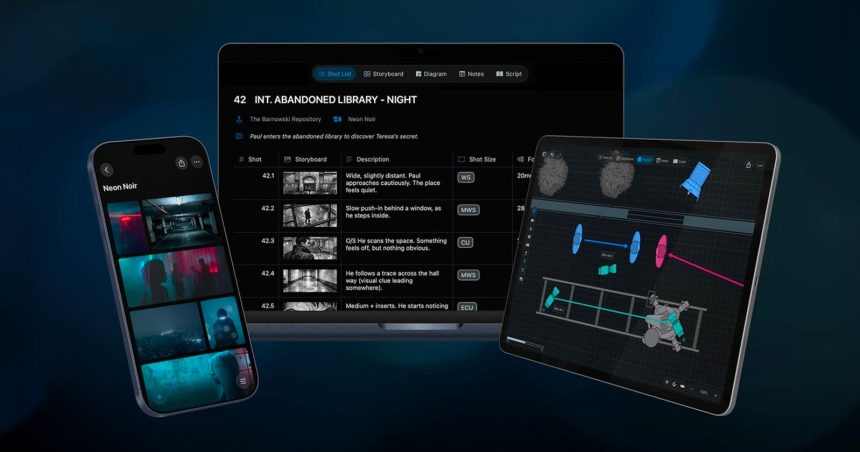
Filmmakers know the drill: a shot list lives in one app, storyboards in another, mood boards scattered across a dozen browser tabs, and the script buried in yet another folder. Cadrage Studio is a direct assault on that fragmentation, folding the messy pre-production workflow into a single, connected workspace.
The app comes from Cadrage GmbH, the Vienna-based team behind the well-regarded Cadrage director’s viewfinder. That pedigree matters here — this isn’t a generic project-management tool with a cinema skin, it’s built by people who understand how directors, DPs and ADs actually think about a scene before a single frame is captured.
What sets Cadrage Studio apart is the idea of keeping everything linked rather than merely stored side by side. The platform brings together the core pillars of prep in one place:
- Shot lists that stay tied to the rest of your project
- Storyboards for visualising sequences
- Camera diagrams to plan blocking and lens positions
- Mood boards for tone and reference
- Script management
- Location planning
Because these elements talk to each other inside a single collaborative environment, a change in one corner of your prep doesn’t leave the rest of your documents out of sync — the perennial headache of juggling half a dozen disconnected apps.
Cadrage Studio is a native macOS and iOS application, and it runs across macOS, iOS and iPadOS. That means you can sketch a camera diagram on an iPad during a location scout and pick it up later on a Mac back at the office. Projects sync across iOS and macOS via iCloud, so your work follows you from tech scout to production office without manual file wrangling. The requirements are current, though: you’ll need macOS 26, iOS 26 or iPadOS 26 or later to run it.
The app launched on July 21, 2026, exiting early access to arrive on the App Store for macOS and iOS. Cadrage has gone with a subscription model rather than a one-off purchase, pricing Studio at US$19.99 per month or US$99.99 per year — the annual plan landing well under the cost of paying monthly across a full year.
For working directors and cinematographers who’ve spent years stitching together a patchwork of single-purpose tools, the pitch is refreshingly simple: one native app, everything connected, syncing across your Apple devices. Whether that’s enough to pull people out of their established (if chaotic) workflows will come down to how deep and flexible each of those modules turns out to be in daily use — but the ambition to unify pre-production under one roof is exactly the kind of thing indie crews have been asking for.